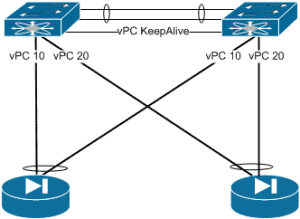
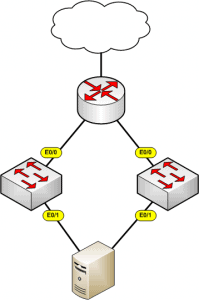
EtherChannel is a port link aggregation technology or port-channel architecture used primarily on Cisco switches. It allows grouping of several physical Ethernet links to create one logical Ethernet link for the purpose of providing fault-tolerance and high-speed links between switches, routers and servers[1]. All member ports within the bundle must have the same physical settings … Read more
Port Aggregation Protocol (PAgP) is a Cisco priority standard that allows multiple physical interfaces to be aggregated into one logical link. Each logical link can contain up-to 8 physical members. All member ports within the bundle must have the same physical settings such as port type, speed and duplex. Modes Within PAgP there are 2 modes … Read more
LACP (Link Aggregation Control Protocol) is an open standards protocol (IEEE802.3ad) that allows multiple physical interfaces to be aggregated into one logical link. Each logical link can contain up-to 8 physical members. All member ports within the bundle must have the same physical settings such as port type, speed and duplex. Modes Within LACP there … Read more
The VLAN database is used to store vlan data, such as the VLAN ID, name and MTU. The default location of the VLAN database is in the local vlan.dat file, this is stored in non-volatile memory. Modify VLANDB Location In order to change the location of where the VLAN information is stored the following command … Read more
Uni-Directional Link Detection detects links where either the transmit or receive path has failed. Used to monitor fibre-optic or twisted pair cabling for unidirectional links. UDLD used periodic hello packets and uses the concept of echos to ensure neighbors are receiving UDLD the UDLD hellos. Supports 2 modes of operations, Normal – Port is placed … Read more
Within this article we will look at a simple network design and the various caveats and considerations involved. Initial Design The initial design (shown below) is simple – a pair of network devices (in this instance Cisco ASAs) connected to a pair of Nexus 3k’s switches. Each firewall is connected to both switches via the … Read more
ovs-vsctl – utility to manage configuration state in ovsdb-server bridge management port management controller management failure mode management ovs-appctl – send commands to ovs-vswitchd ovs-dpctl – Tool to manage datapaths in the kernel directly. Direct management only reallu required when there is no ovs-vswitchd Mostly useful for inspecting kernel … Read more
Introduction Output drops are a result of the traffic rate exceeding the maximum bandwidth specification of a given interface. Given that this is normally an outcome to interface congestion the following steps explain the commands used to clarify the total interface usage in both terms of Mbits and overall utilization. Output Drop Totals To confirm … Read more
Link State Tracking is a feature (within Cisco Switches) that binds the link state of multiple interfaces. This provides the ability to “down” interfaces based upon the link state of upstream interfaces. The diagram below shows a simple of example of an scenario where link state tracking would be required. As you can see from … Read more
Below is a guide to the main areas and features that you should be aware of to ensure that your Cisco Catalyst switch is fully secured within your network. 1. PASSWORDS First of all passwords are configured. One password is used for the enable password and the other will later be assigned to the console … Read more
To setup logging on your Cisco switch is pretty straight forward, you enable logging, you tell it what to log and then were to send it. Below is an example, Switch1#config t Enter configuration commands, one per line. End with CNTL/Z. Switch1(config)#logging ? Hostname or A.B.C.D IP address of the logging host buffered Set buffered … Read more
To select a range of ports, (config)#interface range fast0/1 – 10 (config-if-range)# [any command required]
Below shows the basic minimal configuration for create a Trunk Port. This will allow all VLANs to be sent (still VLAN tagged) out of fast ethernet 0/11. (config)#Int fast0/11(config-if)#switchport mode trunk(config-if)#switchport trunk encapsulation dot1q
Want to become a networking expert?
Here is our hand-picked selection of the best courses you can find online:
Cisco CCNA 200-301 Certification Gold Bootcamp
Complete Cyber Security Course – Network Security
Internet Security Deep Dive course
Python Pro Bootcamp
and our recommended certification practice exams:
Delta Practice Tests