
This guide will show you how to create a policy based VPN on a Netscreen firewall.
The encryption domain will be,
Local Gateway : 2.2.2.2
Local Endpoint : 10.1.1.0 /24
Remote Gateway : 1.1.1.1
Remote Endpoint : 192.1.1.0 /24
1. Log into the Netscreens GUI
2. Click VPNs > Autokey IKE (Autokey IKE Screen is Below)
3. Enter VPN Name
4. Select ‘Create a Simple Gateway’
5. Enter the Gateway Name (This will be the remote peer)
6. Enter the IP address of the Gateway
7. Enter Pre-shared Key
8. Select Outgoing Interface
9. Select ‘Advanced’ (Advanced Autokey IKE screen is below)
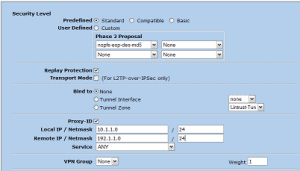
10. Select ‘Replay Protection’
11. Tick Proxy-ID and enter your encryption domain details. * This is not required as the proxy id`s are created from the policy addresses.
12. Click ‘Return’
13. Click ‘OK’
Create a Policy
15. Goto Policy > Policies
16. Select ‘From Trust To Untrust’
17. Select ‘New’
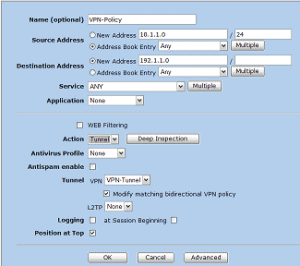
18. Enter Source (local Endpoint)
19. Enter Destination (remote Endpoint)
20. Under Action select Tunnel
21. Under Tunnel select the Tunnel you just created
22. Tick ‘Modify matching bidirectional VPN policy’
23. Tick ‘Position at Top’
Troubleshooting
Heres a few commands that you can use in the event of any issues. The top 2 commands are (in my opinion) the most useful,
- get event include vpn
- get ike ?
- get config | i ike
- get config | i vpn
- get vpn
If you find the following error message in the logs,
The peer sent a proxy ID that did not match the one in the SA exists for the proxy ID received:
local ID (10.1.1.0/255.255.255.0, 0,0) remote ID (1.1.1.1/255.255.255.255, 0, 0).
This normally indicates that there is an issue with the encryption domains matching on both ends. Using this log as an example, you can see that it has the remote gateways IP address rather then the endpoint IP. So this would point to an issue with NAT at the remote end or that the encryption domains being entered incorrectly.

- NETCONF & YANG: Automate Network Configs via Python - April 2, 2026
- Palo Alto – How to Configure Your Next-Generation Firewall - April 2, 2026
- How to Harden Linux SSH: Keys, Fail2ban & Ciphers - March 1, 2026
Want to become an IT Security expert ?
Here is our hand-picked selection of the best courses you can find online:
Internet Security Deep Dive course
Complete Cyber Security Course – Hackers Exposed
CompTIA Security+ (SY0-601) Certification Complete course
and our recommended certification practice exams:
Delta Practice Tests