
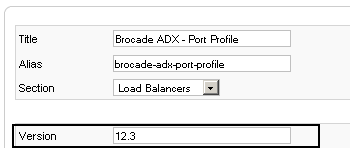
Within this tutorial, I will show you the necessary steps required to add a custom field named ‘Version’ to your Joomla site. This field will be displayed within both the administrator console and the published article.
Table of Contents
1. Configure Database
Within phpmyadmin run the following SQL command
ALTER TABLE `jos_content` ADD `vers` VARCHAR( 255 ) NOT NULL
2. Edit PHP
Next we will edit the core Joomla files (php) so that the field is displayed in both the admin console and the article itself.
2.1 Change Directory
cd /var/www/html/[webroot]/
2.2 libraries/joomla/database/table/content.php
At line 88 add the following line,
var $vers = null;
2.3 administrator/components/com_content/controller.php
At line 327 add the following line,
$row->vers =$item->version;
2.4 administrator/components/com_content/admin.content.html.php
At line 835 add the following. This will add the new field to the administration console when creating a new article.
<table class=”adminform”>
<tr>
<td class=”customfieldtd”>
<label for=”Version”>
<?php echo JText::_( ‘Version’ ); ?>
</label>
</td>
<td>
<label for=”Version”>
<input class=”inputbox” type=”text” name=”vers” id=”vers” size=”40″ maxlength=”55″ value=”<?php echo $row->vers; ?>” />
</label>
</td>
</tr>
</table>
2.5 components/com_content/views/article/tmpl/default.php
At line 61 add the following. This will display the new field within the article.
<?php
$db =& JFactory::getDBO();
$thisArticle=JRequest::getInt( ‘id’);
$query1 = ‘SELECT vers FROM #__content WHERE id = ‘ . $thisArticle;
$db->setQuery($query1, 0, 1);
$field1 = $db->loadResult();
if (!$field1==””) {
echo “<table class=”vertable”>”;
echo “<tr class=”vertr”>”;
echo “<td class=”vercol1″>Version</td>”;
echo “<td class=”vercol2″>$field1</td>”;
echo “</tr>”;
echo “</table>”;
}
?>
3. Edit CSS
In order to keep your new field aligned within the article manager the following CSS entry is added to your templates CSS.
.customfieldtd {
width: 10.8%;
}
4. Example
Below shows you the changes should look once you have made the changes above.

- NETCONF & YANG: Automate Network Configs via Python - April 2, 2026
- Palo Alto – How to Configure Your Next-Generation Firewall - April 2, 2026
- How to Harden Linux SSH: Keys, Fail2ban & Ciphers - March 1, 2026
Want to become a Joomla expert ?
Here is our hand-picked selection of the best courses you can find online:
The Complete Web Development Bootcamp course
Joomla for Beginners course
Professional Websites with Joomla Gantry course
and our recommended certification practice exams:
Delta Practice Tests