
Below provide sample configurations required for building a site to site VPN between a Cisco PIX and a Check Point Firewall.
Table of Contents
PIX Configuration
(config)#isakmp enable outside
 (config)#isakmp policy 10
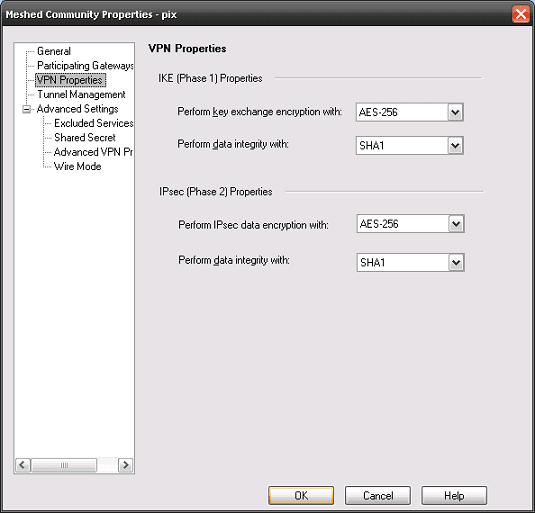
 (config-isakmp-policy)# encryption aes-256
 (config-isakmp-policy)# hash sha
 (config-isakmp-policy)# authentication pre-share
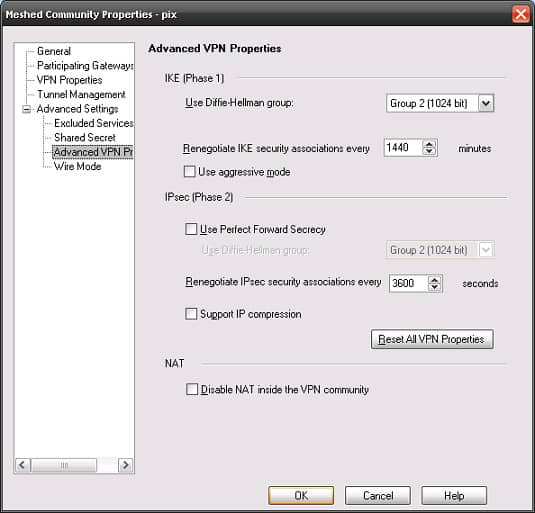
 (config-isakmp-policy)# group 1
 (config-isakmp-policy)# lifetime 86400
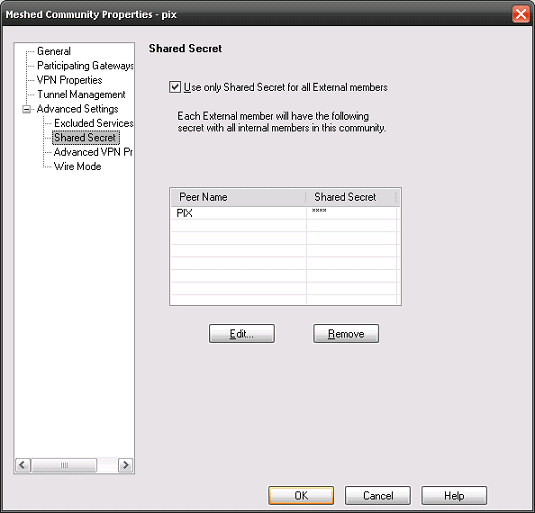
(config)#isakmp key shabba address 1.1.1.1 netmask 255.255.255.255 no-xauth
(config)#access-list ED permit ip 172.16.1.0 255.255.255.0 172.16.5.0 255.255.255.0
(config)#access-list nonat permit ip 172.16.1.0 255.255.255.0 172.16.5.0 255.255.255.0
(config)#nat (inside) 0 access-list nonat
(config)#Crypto ipsec transform-set TRAN esp-aes-256 esp-sha-hmac
(config)#Crypto map MYFW_MAP 10 ipsec-isakmp
(config)#Crypto map MYFW_MAP 10 match address ED
(config)#Crypto map MYFW_MAP 10 set peer 1.1.1.1
(config)#Crypto map MYFW_MAP 10 set transform-set TRAN
(config)#Crypto map MYFW_MAP 10 set security-association lifetime seconds 3600
(config)#Crypto map MYFW_MAP interface outside
(config)#Crypto isakmp identity address
(config)#sysopt connection permit-vpn
Check Point (R65) Configuration
Below details the required Check Point configuration steps:
- Configure a Simplified VPN Mesh.
- Create a interoperable object for the PIX, then configure the topology settings.
- Add the Gateways and the security rule to allow the traffic through.
- Next add the necessary configuration as per below:
Issues
Problem A
If on the Check Point you are getting logs saying the above, run a tcpdump & capture on the firewalls and check if the IKE traffic is reaching its Peer. This error normally points to a routing or connectivity issue.
Problem B
If on the PIX you are getting the following, check your encryption domain settings on both sides.
Debugging
Below is a subset of commands which can be used for the troubleshooting of VPN issues.
PIX
- debug crypto ipsec 7
- debug crypto isakmp 7
- no debug all
Check Point
- vpn debug trunc
- vpn debug off; vpn debug ikeoff
Note : The debug file is located under $FWDIR/log/ike.elg and $FWDIR/log/vpnd.elg

- NETCONF & YANG: Automate Network Configs via Python - April 2, 2026
- Palo Alto – How to Configure Your Next-Generation Firewall - April 2, 2026
- How to Harden Linux SSH: Keys, Fail2ban & Ciphers - March 1, 2026
Want to become an IT Security expert ?
Here is our hand-picked selection of the best courses you can find online:
Internet Security Deep Dive course
Complete Cyber Security Course – Hackers Exposed
CompTIA Security+ (SY0-601) Certification Complete course
and our recommended certification practice exams:
Delta Practice Tests