
Table of Contents
What is MTU ?
When sending traffic across a network, computers use something called an MTU (Maximum Transmission Unit). This (network interface) setting dictates the size of the largest frame it can send across the network.
Below shows the MTU default,
| Network | MTU(Bytes) |
|---|---|
| X.25 | 576 |
| IEEE 802.3/802.2 | 1492 |
| Ethernet | 1500 |
| FDDI | 4352 |
| Token Ring | 17914 |
Example : A server is wanting to send an Ethernet Packet using TCP. The default MTU would be 1500 which excludes the Ethernet headers and trailers. The TCP header would use 20 bytes, with another 20 bytes used for the IP header. Leaving us with 1460 bytes for the date payload.
What does this have to do with PMTU Discovery ?
When a server sends its traffic across the network (internet), one of the network devices (routers, etc) may have an MTU smaller then the sending computer.
In this scenario 2 things can happen.
- Fragmentation – If the sending computer has not set the DF (Don`t Fragment) bit, then the traffic will be fragmented.
- Path MTU Discovery – If the DF (Don`t Fragment) bit is set the network device will send an ICMP packet back to the sending computer stating its MTU size.
Modern systems tend not to use fragmentation due to the overhead involved in sending multiple packets, not to mention the various security issues involved.
A closer look at PMTU Discovery ?
When the networking node (router) receives the frame which is larger then the outgoing interfaces MTU it checks for the DF bit. If the DF bit is set, it is unable to fragment the packet so it discards the packet and sends a ICMP (Type 3 Code 4) message ‘Fragmentation needed and DF set’ message back to the sender.
This message is stating that it needs to fragment the packet but it is unable to because of the DF bit being set. RFC 1911 expands this ICMP message to incorporate the MTU of the interface that is unable to fragment the packet (shown below). Once the sender has received this ICMP message it can then adjust its MTU so that it can send a packet at the correct size so that the router is then able to pass it on.
Below shows an sample of the ICMP header and ‘next-hop MTU field’ field,
Internet Control Message Protocol
Type: 3 (Destination unreachable)
Code: 4 (Fragmentation needed)
Checksum: 0x3147 [correct]
MTU of next hop: 1400
What is a PMTU Black Hole ?
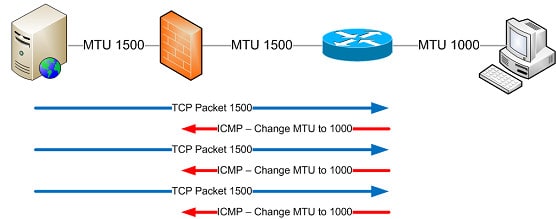
A PMTU black hole is where the ICMP message doesn’t reach the sending host to inform it that it needs to adjust its MTU. This can be down to the router not sending the ICMP message or the ICMP message being blocked on the way back to the sender,
In this scenario the sender is waiting for an acknowledgment for its sent packet. The destination is still waiting for its packet, and the whole session falls down.
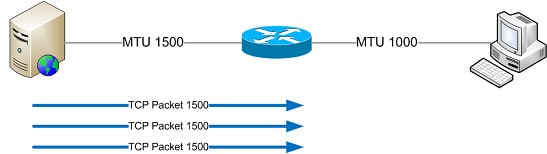
Below shows you the 2 scenarios,
ICMP messages not being sent
ICMP messages being blocked
This causes a number of issues. Such as the client finding they might be unable to access one site, this is normally an SSL based site due to the data payload overhead of SSL.
The most common scenario that I see is where a page will load but it will take ages to do so. This can be down to black hole detection. In this case the sending server doesn’t receive an acknowledgment for their sent packets so after a certain amount of retries it reduces its MTU (and in turn MSS) and tries resend the packets, in a hope that the reduced packets will make it through to the destination. Of course this greatly increases the delay when trying open the web page, and can cause much confusion to the client and system admins.
Troubleshooting Steps
Using the ping command we can troubleshoot and hopefully find the hop in which the blackhole exists. By using the ping commands to send a packet at various sizes with the DF bit set we can see if the router sends back the correct ICMP message, what the PMTU is, and where the black hole actually is.
These steps are based on the Windows ping command. We will use the following switches in this troubleshooting exercise,
- -l Sets the size of the payload with the ICMP packet.
- -f Sets the DF (Do Not Fragment) bit.
So to calculate a ICMP packet that will have an MTU of 1500 will we use the following,
- MTU = 20 Bytes (IP Header) + 8 bytes (ICMP Header) + 1472 Bytes (ICMP Payload)
So when selecting the Maximum Transmission unit you want to send, minus 28 bytes from your total MTU size to obtain your ICMP payload size.
First we will send a packet with an MTU of 1500,
From the response we can determine the following,
- The Ping is successful and you receive echo replies – Each hop has an MTU of 1500.
- You receive the message “Packet needs to be fragmented but DF set” – The router has successfully sent the correct ICMP response (required for PMTUD)
- You receive the messages “Request timed out” – The router hasn’t send the required ICMP message needed for PMTUD.
By increasing and decreasing the ICMP payload size (-l switch) you can determine the Path MTU to your destination.
ping [destination ip/name] -f -l 1472
References
- http://www.faqs.org/rfcs/rfc2923.html
- http://packetlife.net/blog/2008/aug/18/path-mtu-discovery/
- http://www.netheaven.com/pmtu.html

- NETCONF & YANG: Automate Network Configs via Python - April 2, 2026
- Palo Alto – How to Configure Your Next-Generation Firewall - April 2, 2026
- How to Harden Linux SSH: Keys, Fail2ban & Ciphers - March 1, 2026
Want to become a networking expert ?
Here is our hand-picked selection of the best courses you can find online:
Cisco CCNA Certification Gold Bootcamp
Complete Cyber Security Course – Network Security
Internet Security Deep Dive course
Python Pro Bootcamp
and our recommended certification practice exams:
Delta Practice Tests