
SSH port forwarding (or tunneling) re-routes TCP/IP connections through an established SSH connection. Being encapsulated within SSH provides security benefits along with the ability to route traffic through firewalls using just port 22 (SSH).
In this example we will proxy our web traffic via our remote server across an established SSH connection.
This is achieved by using Dynamic Port Forwarding on our localhost.
Dynamic port forwarding allows an ssh client to run a SOCKS proxy on localhost, which allows the forwarding of any port to any internet server through the remote ssh server. It looks a bit like this:
- Client machine sends a HTTP request to the localhost SOCKS proxy (SSH Client).
- The SSH Client then forwards the request to the remote SSH host.
- The Remote SSH host forwards request to the appropriate server.
This example is based on our web browser being Firefox on a Windows based system. We will also being using putty as the SSH Client on our localhost.
Steps
- On your client run the command within your command prompt – putty -D 8080 [remote server ip]
- Configure your Firefox Proxy settings. Go into “Tools | Options | Network | Setting”. And configure it as per below.
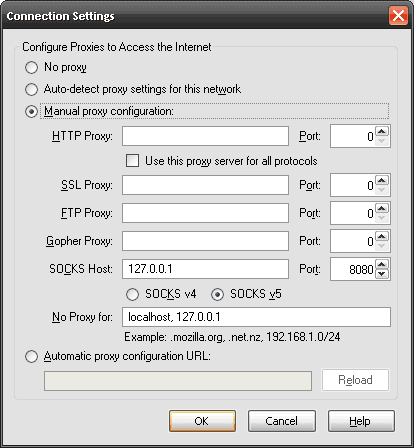
3. Goto the site www.whatismyipaddress.com and confirm that your connection is working via your Remote Server.

- NETCONF & YANG: Automate Network Configs via Python - April 2, 2026
- Palo Alto – How to Configure Your Next-Generation Firewall - April 2, 2026
- How to Harden Linux SSH: Keys, Fail2ban & Ciphers - March 1, 2026
Want to become a networking expert ?
Here is our hand-picked selection of the best courses you can find online:
Cisco CCNA Certification Gold Bootcamp
Complete Cyber Security Course – Network Security
Internet Security Deep Dive course
Python Pro Bootcamp
and our recommended certification practice exams:
Delta Practice Tests