
In this article we will be covering SSH port forwarding also known as SSH tunneling.
As previously discussed in our previous article Proxing Web Traffic across a SSH Tunnel using SSH Dynamic Port Forwarding, SSH port forwarding (or tunneling) re-routes TCP/IP connections through an established SSH connection. Being encapsulated within SSH provides security benefits along with the ability to route traffic through firewalls using just port 22 (SSH).
Note : This article includes – Putty Commands (Windows) / SSH Commands (Linux)
Forwarding your local port to a remote address
This allows you to forward you local port to a remote address.
Our example is based on a VNC connection to your server over a secure connection.This will create a port of 7777 on your local host. All traffic to this port will be forwarded to your remote server IP (over ssh) to the port of 5900.
C:\Documents and Settings\admin> putty -L 7777:[Local Server IP]:5900 [Remote Server IP]
[root@linux]# ssh -L 7777:[Local Server IP]:5900 [Remote Server IP]
Forwarding a remote port to your local address
This allows you to forward a remote port to your localhost.
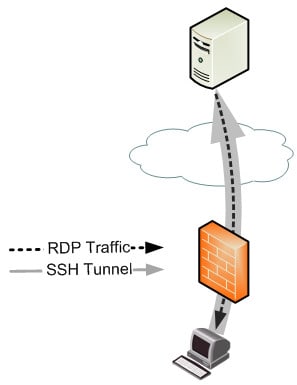
Our example below is based on a RDP into a workstation that is sitting behind a firewall of which you only have a outbound ssh access from.
Below will create a port of 7777 on your remote host. All traffic to this port will be forwarded to your local workstation (over ssh) to the port of 3389.
C:\Documents and Settings\admin> putty -R 7777:127.0.0.1:3389 [remote server ip]
[root@linux]# ssh -R 7777:127.0.0.1:3389 [remote server ip]

- NETCONF & YANG: Automate Network Configs via Python - April 2, 2026
- Palo Alto – How to Configure Your Next-Generation Firewall - April 2, 2026
- How to Harden Linux SSH: Keys, Fail2ban & Ciphers - March 1, 2026
Want to become a networking expert ?
Here is our hand-picked selection of the best courses you can find online:
Cisco CCNA Certification Gold Bootcamp
Complete Cyber Security Course – Network Security
Internet Security Deep Dive course
Python Pro Bootcamp
and our recommended certification practice exams:
Delta Practice Tests