
What is EndPoint Connect ?
Check Point`s Endpoint Connect software provides a number of client side security based features such as Anti-virus/Anti-spyware. Firewall/Email Protection, Program Control and Remote Access VPN. This document will only details and discuss the Remote Access VPN section of the Endpoint Connect Software. Note : This document will refer to the Endpoint Connect Remote Access VPN as just Endpoint Connect.
Endpoint Connect is built into the software for mangers and gateways running R70 and above. For R65 gateways that require Endpoint Connect a few additional configuration steps are required which are included within this document.
Please note : This testing and documentation is based on the Endpoint Connect R73 Client.
Advantages
- Lightweight Client if you are using a single site or single entry point setup.
- Can be installed onto Windows 7 64-bit.
Disadvantages
- An additional SNX (SSL Network Extender License) is required due to that in which it authenticates across HTTPS (vistor mode)
- Link Selection is disabled (this is due to sites being defined via a single IP address).
- MEP configurations can only be achieved by using Geo-Cluster DNS name resolution.
Installation on an R65 Gateway
Upgrading a R65 Gateway to R65 Endpoint Connect:
- Ensure that you are running HFA40 or higher.
- Ensure that you are managing the gateway with R70 or higher.
You will now be able to configure the required Endpoint Connect settings via the Smart Dashboard.
Configuration
To enable Endpoint Connect configure/enable the following settings :
Under the Check Point Gateway Object
1. Enable VPN
2. Create a VPN domain
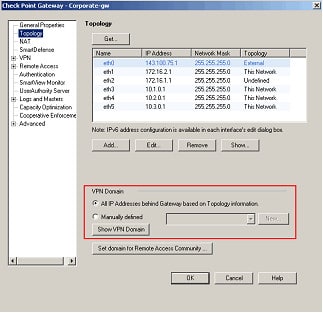
3. Enable NAT-T
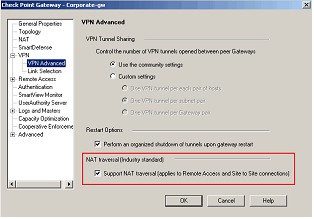
4. Enable Visitor Mode :
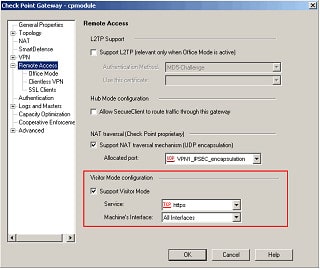
5. Enable Office mode
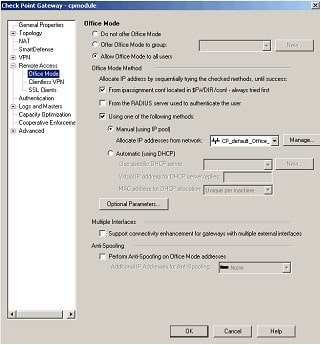
6. Enable SSL Network Extender
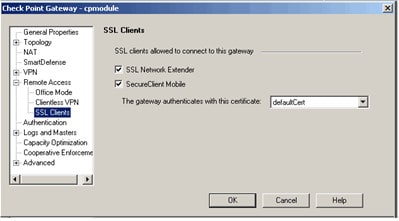
7. Endpoint connect doesn`t support DES. If this is set please re-configure.
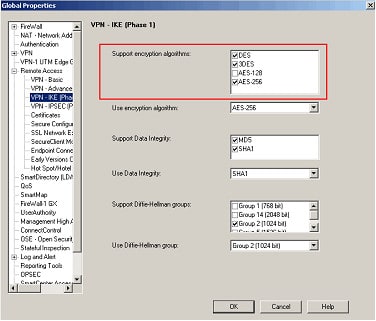
Additional Settings
Further settings can be set within the Global Properties:
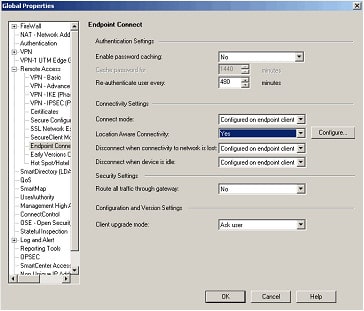
Troubleshooting
Issue : Authenticating failed: GEN_application_error(0)
You may receive this error when trying to login.
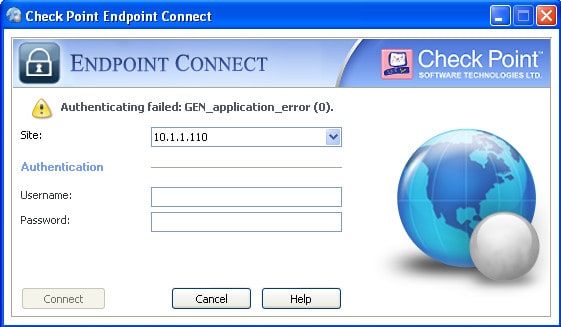
This is down to your client being unable to authenticate with the VPN gateway using HTTPS. This can be caused by the following:
1. Port 443/tcp on the firewall is assigned to a web management GUI (WEBUI/Voyuger) instead of VPND.
2. Port 443/tcp is not listening due to no SNX (SSL Network Extender) License being present.
Issue : Failed to download topology
Endpoint Connect fails to connect to NGX R65 Security Gateways that are managed by an R70 Security Management server with error: “failed to download topology”.
To resolve this run through the following steps :
1. On the R70 Security Management server, edit the file:
/opt/CPNGXCMP-R70/lib/vpn_table.def
2. Scroll down to the section that starts with:
/* Slim Client gateway tables */
3. Add the entry for the ccc_sessions table below it:
ccc_sessions = dynamic expires 900 keep sync kbuf 1;
4. After adding this entry to the vpn_table.def file, open SmartDashboard and re-install policy to the NGX R65 Security Gateway(s).
Further details can be found within the Check Point KB article sk43124
Licensing
Details on licensing can be found within Check Points KB article sk43329.

- NETCONF & YANG: Automate Network Configs via Python - April 2, 2026
- Palo Alto – How to Configure Your Next-Generation Firewall - April 2, 2026
- How to Harden Linux SSH: Keys, Fail2ban & Ciphers - March 1, 2026
Want to become an IT Security expert ?
Here is our hand-picked selection of the best courses you can find online:
Internet Security Deep Dive course
Complete Cyber Security Course – Hackers Exposed
CompTIA Security+ (SY0-601) Certification Complete course
and our recommended certification practice exams:
Delta Practice Tests