
Table of Contents
Introduction
Client and Server side NAT relates to when we perform destination NAT`ing.
The “Translate destination on Server side” option is an legacy option which was included due to pre NG versions of checkpoint using Server-Side NAT.
Client Side NAT – The destination address is NAT`d by the inbound Kernel
Server Side NAT – The destination address is NAT`d by the outbound Kernel
Note : Source NAT always happens on the Outbound Kernel.
Note : Rule > NAT – The kernels will always process the rules before the NAT.
So why does this matter ?
Well when we use client side NAT the IP address is NAT`d before it hits the routing table. So we can route the packet based on the real IP.
But when we use Server side NAT the IP is NAT`d after passing the routing table so there has to be a route for NAT`d (fake) IP in the routing table so that the operating system can pass the packet to the correct interface.
To explain things a little easier have a look at the diagram below,
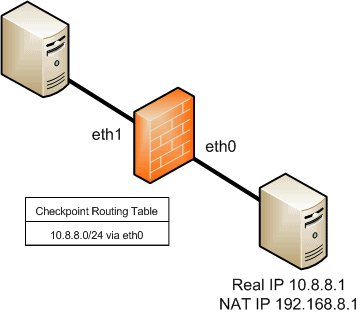
So we want to access the server (10.8.8.1). If we use Client Side NAT the inbound kernel will NAT the destination IP (192.168.8.1) to the real IP (10.8.8.1) and then pass the packet to the (OS) routing table. Which as you can see will have the routing entry for this subnet and pass it out (via the outbound kernel) to the interface (eth0).
But if we use Server Side NAT the packet would not get NAT`d by the inbound kernel. It would get to the (OS) routing table with a destination of 192.168.8.1. Which, there is no entry for. We would need to add an entry to the routing table. Once added the operating system would know where to route this packet, the packet would pass through the outbound kernel which would NAT the destination IP to 10.8.8.1.
Note: Client AND Server side NAT are options ONLY for destination NAT.
Additional

- NETCONF & YANG: Automate Network Configs via Python - April 2, 2026
- Palo Alto – How to Configure Your Next-Generation Firewall - April 2, 2026
- How to Harden Linux SSH: Keys, Fail2ban & Ciphers - March 1, 2026
Want to become an IT Security expert ?
Here is our hand-picked selection of the best courses you can find online:
Internet Security Deep Dive course
Complete Cyber Security Course – Hackers Exposed
CompTIA Security+ (SY0-601) Certification Complete course
and our recommended certification practice exams:
Delta Practice Tests