
This guide will outline OPSEC LEA and how it works within a Check Point Infrastructure.
What is OPSEC LEA ?
The OPSEC LEA (Log Export API) provides the ability to pull logs from a Check Point device based on the OPSEC SDK. OPSEC LEA listens on port tcp/18184 on the device (OPSEC LEA Server) which will contain your logs. Your OPSEC LEA Client will then connect into 18184 and pull the logs.
Check Point Terms and Components
When configuring your software to pull logs using OPSEC LEA there are a few terms that you will need to know.
The Check Point foundations
The main components required for Check Point are:
- Firewall / VPN-1 – Firewall/VPN Gateway
- Smart Centre Server – Manager/Policy Server for all other objects such as firewalls and log managers.
- Log Manager – Log manager for which any Check Point object can forward its logs to.
Please Note: All of these components can be installed onto the same device or each component onto different devices.
Provider-1
Ok, now to confuse things slightly more you have Provider-1. Provider-1 allows for you to install multiple log managers and smart centre servers upon single devices using the specific Provider-1 software. Along with using a range of new acronyms for the various components,
- CMA – Customer Management Add-on. You can also think of this as a “logical” Smart Center Server
- CLM – Customer Log Manager. You can also think of this as a “logical” Log Manager
- MDS – Multi Domain Server. This contains all of you various CMAs.
- MLM – Multi-Domain Log Module. This contains all of your CLMs.
Generic Related Terms
- OPSEC LEA – Check Point Log Extraction Agent that allows the extraction of Logs via Check Points SIC.
- OPSEC LEA Client – This is the 3rd Party software which is defined as an OPSEC LEA Object via the Smart Dashboard.
- OPSEC LEA Server – This is the device which we will pull the logs from. This can be any device and does not have to be just a Smart Centre Server or a Log Manager
General Setup
Though the steps between vendors may be slightly different the overall steps will remain the same :
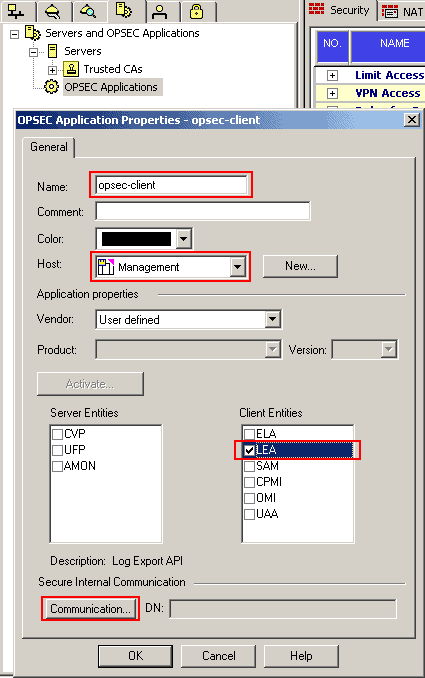
- Create an OPSEC LEA Object within the OPSEC LEA and Applications Tab.
- Name the object, add the host that the software (OPSEC LEA Client will pull the logs from) and select LEA as the Client Entries.
- Within the SIC Communication section add an Activation Key and chose activate.
- Install the Database to the Manager. (There is no need to repush the policy to the gateways)
- You will then be able to (within the 3rd Party Software) use this SIC Activation Key to pull a SSL Cert from the Manager. This will allow you to directly talk to the device holding the Logs (OPSEC LEA Server).

- NETCONF & YANG: Automate Network Configs via Python - April 2, 2026
- Palo Alto – How to Configure Your Next-Generation Firewall - April 2, 2026
- How to Harden Linux SSH: Keys, Fail2ban & Ciphers - March 1, 2026
Want to become an IT Security expert ?
Here is our hand-picked selection of the best courses you can find online:
Internet Security Deep Dive course
Complete Cyber Security Course – Hackers Exposed
CompTIA Security+ (SY0-601) Certification Complete course
and our recommended certification practice exams:
Delta Practice Tests