
This article shows you how to script and alert (via email) for when any of your RAID disks show as offline or your Logical Drive is not showing as optimal.
In order to obtain all the stats about your Adaptec RAID card from your ESX box you can install the asm (adaptec storage manager) rpm which you can get from the Adaptec website.
Once this is installed you can then run a number of commands via the shell to query you RAID card.
- Due to using a script and not using its java gui i removed the gui from the startup scripts via “chkconfig –del stor_agent”
- Ensure you have ssmtp installed so that you can send emails via your command line.
- You will now need to add this script to your cron job.
#!/bin/bash
### IMPORT ENV VARIABLES ###
export PATH=/usr/kerberos/sbin:/usr/kerberos/bin:/usr/local/sbin:/usr/local/bin:/sbin:/bin:/usr/sbin:/usr/bin:/root/bin
### ASSIGN VARIABLES ###
MAILFROM=
MAILTO=
SSMTP=/usr/sbin/ssmtp
ARCCONF=/usr/StorMan/arcconf
HTMLOUT=/tmp/raidcheck-htmlout.$$
### WRITE RAID STATS TO TMP FILE ###
if [ ! -x "${ARCCONF}" ] ; then
echo "Error: Unable to execute "${ARCCONF}"" | /usr/bin/logger -t raidcheck -p daemon.err
echo "Error: Unable to execute "${ARCCONF}""
else
rm -f /tmp/raidcheck*
"${ARCCONF}" GETCONFIG 1 LD > /tmp/raidcheck.$$
"${ARCCONF}" GETCONFIG 1 PD >> /tmp/raidcheck.$$
"${ARCCONF}" GETCONFIG 1 AD >> /tmp/raidcheck.$$
RC=$?
sed -i 's/^.*Command completed successfully.*$\|^.*Controllers found.*$\|^$//g' /tmp/raidcheck.$$
fi
if [ "${RC}" != 0 ] ; then
echo "Error: Unsuccessful execution of "${ARCCONF}"" | /usr/bin/logger -t raidcheck -p daemon.err
exit 1
fi
### SORT RAID ARRAY DETAILS AND EMAIL ###
CSTATUS=$(grep -i "status of logical device" /tmp/raidcheck.$$ | sed 's/^.*: //g')
if [ "${CSTATUS}" = Optimal ] ; then
exit 1
else
########################
### BUILD HTML EMAIL ###
########################
cat << EOF > "${HTMLOUT}"
To: ${MAILTO}
From: ${MAILFROM}
Subject: `hostname` - RAID Array ${CSTATUS}
Content-Type: text/html; charset=us-ascii
Content-Transfer-Encoding: 7bit
MIME-Version: 1.0
<html>
<style type="text/css">
body {
font-family:verdana;
font-size:90%;
line-height:160%;
}
table.mainsection {
background-color:#838B8B;
width:50%;
color:white;
text-align:left;
}
table.subsection {
background-color:#B7C3D0;
color:white;
width:49%;
text-align:left;
font-size:92%;
margin-left:11px;
line-height:14px;
}
</style>
<body>
<img src="http://graphics.adaptec.com/us/templates/head_logo.gif" />
<p>
EOF
sed ':a; s/^\( *\) \([^ ]\)/\1\ \;\2/; t a;/^$/d;s/$/<br>/g;s/^<br>//g' /tmp/raidcheck.$$ >> "${HTMLOUT}"
### ADD TABLES FOR SECTION HEADERS ###
for i in "Logical device information" "Physical Device information" "Controller information"
do
sed -i "s/$i<br>/<table class="mainsection">\n<\/tr>\n<th>$i<\/th>\n<tr>\n<\/table>/" "${HTMLOUT}"
done
for i in "Logical device segment information" "Controller Version Information" "Controller Battery Information"
do
sed -i "s/$i<br>/<table class="subsection">\n<\/tr>\n<th>$i<\/th>\n<tr>\n<\/table>/" "${HTMLOUT}"
done
### TIDY UP HTML ###
sed -i 's/^.*---//g;/^<br>$/d;s/ <table/<table/g' "${HTMLOUT}"
echo \</p\> >> "${HTMLOUT}"
echo \</html\> >> "${HTMLOUT}"
### SEND EMAIL ###
which ssmtp > /dev/null
if [ "${RC}" != 0 ] ; then
echo "Error: Unable to locate SSMTP" | /usr/bin/logger -t raidcheck -p daemon.err
exit 1
else
cat "${HTMLOUT}" | "${SSMTP}" "${MAILTO}"
exit 0
fi
fi
You will need to change the email variables.
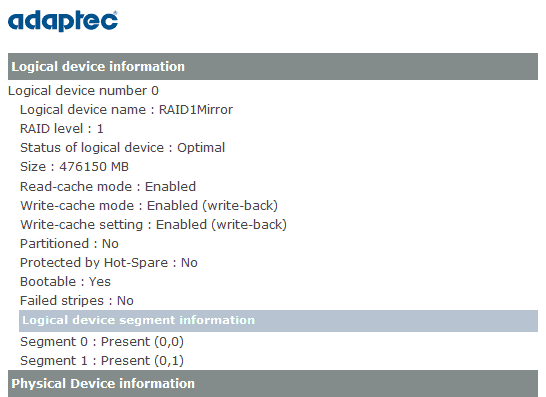
Here’s a sample of the html based email that is generated …

- NETCONF & YANG: Automate Network Configs via Python - April 2, 2026
- Palo Alto – How to Configure Your Next-Generation Firewall - April 2, 2026
- How to Harden Linux SSH: Keys, Fail2ban & Ciphers - March 1, 2026
Want to become a VMware expert ?
Here is our hand-picked selection of the best courses you can find online:
Complete VMware Administration course
VMware vSphere 8 – Install, Configure, Manage
and our recommended certification practice exams:
Delta Practice Tests